Appearance
Write and run a custom Python node
This tutorial turns a small NumPy threshold function into a discoverable Microscope workflow node. It demonstrates how the Python function, declared schema, registered pack, and viewer graph fit together. The output is a simple binary mask, not a clinical segmentation model.
What you will build
The example node receives a browser-captured RGB region (image), computes the mean of its three color channels, and marks pixels darker than a configurable threshold. It returns a mask raster aligned to the same region. The implementation uses NumPy and the Microscope node API; no model weights or OpenCV are required.
Arbitrary Python code is not automatically a workflow node. To appear in the node library, code must be exposed by a Python class that implements microscope.nodes.Node, has a stable identifier and typed schema, and is named in an installed/registered microscope-node.toml pack manifest. The companion executes a trusted pack in its selected Python environment; registration is not a security sandbox.
Requirements
- Python 3.10 or later.
- A Microscope Python checkout installed into the companion environment.
- NumPy 2.x in the custom pack environment.
- A supported desktop browser with a slide open for execution.
The SDK currently documents Python >=3.10 in pyproject.toml. Some native scientific dependencies have tighter platform support; this NumPy-only example avoids OpenSlide and model dependencies. The viewer itself does not require Python.
1. Create the package
Start from the runnable node source, pack manifest, package configuration, and unit test. The example's sample workflow JSON is also available to download.
text
custom-threshold-pack/
├── microscope-node.toml
├── pyproject.toml
└── lab_nodes/
    └── __init__.py
The package metadata declares NumPy as its dependency:
toml
[build-system]
requires = ["setuptools>=68"]
build-backend = "setuptools.build_meta"

[project]
name = "microscope-example-threshold-node"
version = "1.0.0"
requires-python = ">=3.10"
dependencies = ["numpy>=2,<3"]

[tool.setuptools.packages.find]
include = ["lab_nodes"]
The root manifest statically declares the pack and node. The companion can inspect it without importing Python code:
toml
schema_version = 1
id = "example.lab"
name = "Example Lab Nodes"
version = "1.0.0"
nodes = ["lab_nodes:MeanDarkMask"]
dependencies = ["numpy>=2,<3"]
2. Declare a typed node and implement the analysis
lab_nodes/__init__.py:
python
import numpy as np
from microscope.nodes import BinaryMask, Float, Image, Node


class MeanDarkMask(Node):
    id = "example.lab.mean_dark_mask"
    version = 1
    name = "Mean dark-pixel mask"
    category = "Tissue demonstration"
    description = "Marks RGB pixels whose channel mean is below a configurable cutoff."

    inputs = {"image": Image}
    outputs = {"mask": BinaryMask}
    parameters = {
        "threshold": Float(
            160,
            min=0,
            max=255,
            label="Mean intensity cutoff",
            description="Pixels at or below this 8-bit mean are marked foreground.",
        )
    }

    def run(self, image, threshold):
        if image.ndim != 3 or image.shape[2] != 3:
            raise ValueError("Expected an RGB image with three channels")
        mean_intensity = image.astype(np.float32).mean(axis=2)
        return {"mask": (mean_intensity <= threshold).astype(np.uint8)}
The SDK validates port names, data types, parameter defaults, and numeric bounds from the class schema. The viewer uses the same descriptor to render the parameter control. Output masks must match the incoming spatial grid; changing array shape requires an explicit geometry operation rather than silently shifting the layer.
3. Test the function and schema locally
Install the package into its own environment, and install the SDK editable into that same environment so the public microscope.nodes API is available:
sh
python3 -m venv .venv
.venv/bin/python -m pip install -e /path/to/microscope-python
.venv/bin/python -m pip install -e /path/to/custom-threshold-pack
Run this smoke test from the pack directory:
sh
.venv/bin/python - <<'PY'
import numpy as np
from lab_nodes import MeanDarkMask

node = MeanDarkMask()
schema = node.schema()
assert schema["inputs"] == {"image": "image"}
assert schema["outputs"] == {"mask": "mask"}
assert schema["parameters"]["threshold"]["default"] == 160

rgb = np.array([[[10, 20, 30], [200, 210, 220]]], dtype=np.uint8)
mask = node.run(rgb, threshold=100)["mask"]
assert mask.tolist() == [[1, 0]]
print("schema and NumPy example passed")
PY
This verifies the code and schema, not browser pairing. The companion also validates the output against the declared mask port at runtime.
4. Register the pack with the companion
Install the workflows extra in the environment used to start the companion, create a separate node environment as above, and register the local checkout:
sh
python3 -m venv /path/to/microscope-python/.venv
/path/to/microscope-python/.venv/bin/python -m pip install -e '/path/to/microscope-python[workflows]'
/path/to/microscope-python/.venv/bin/microscope nodes register \
  /path/to/custom-threshold-pack \
  --python /path/to/custom-threshold-pack/.venv/bin/python --trust
register records the local pack and selected interpreter; it does not install dependencies into that interpreter. The two commands above perform those installs explicitly. Restart the companion after registration:
sh
/path/to/microscope-python/.venv/bin/microscope serve \
  --origin http://localhost:5173
For a different host or port, use the exact viewer origin. Pair using the short-lived code shown by microscope serve; accept browser local-network access when prompted. A paired workflow can execute Python with the local user's permissions. Review the pack source and dependencies before trusting it.
5. Discover the node, import the sample graph, and run
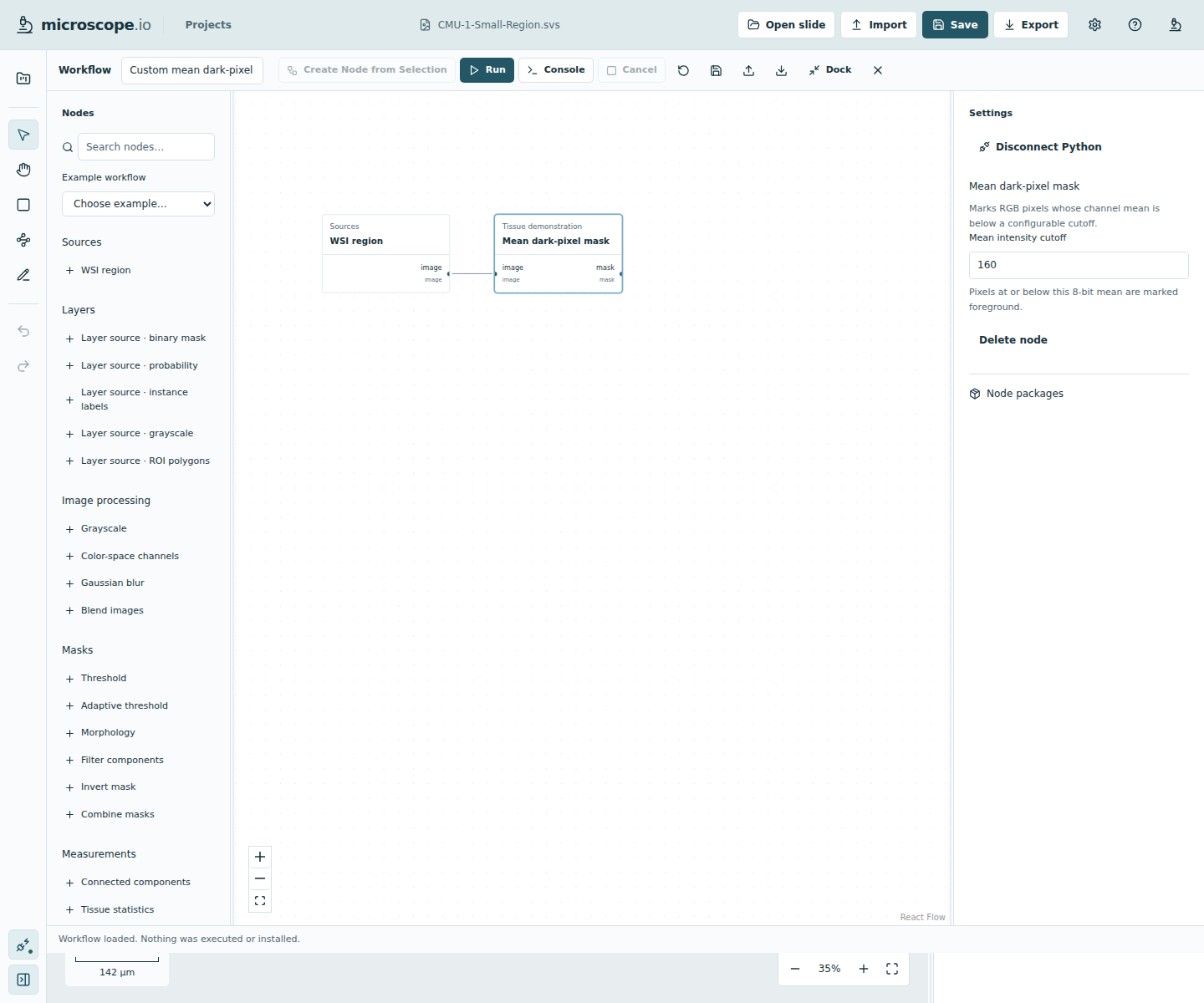
Open a slide in Microscope and open Workflow. Reconnect or refresh the node library. Search for Mean dark-pixel mask and add it, or import the sample workflow JSON. The sample graph connects the built-in WSI Region source to example.lab.mean_dark_mask:
text
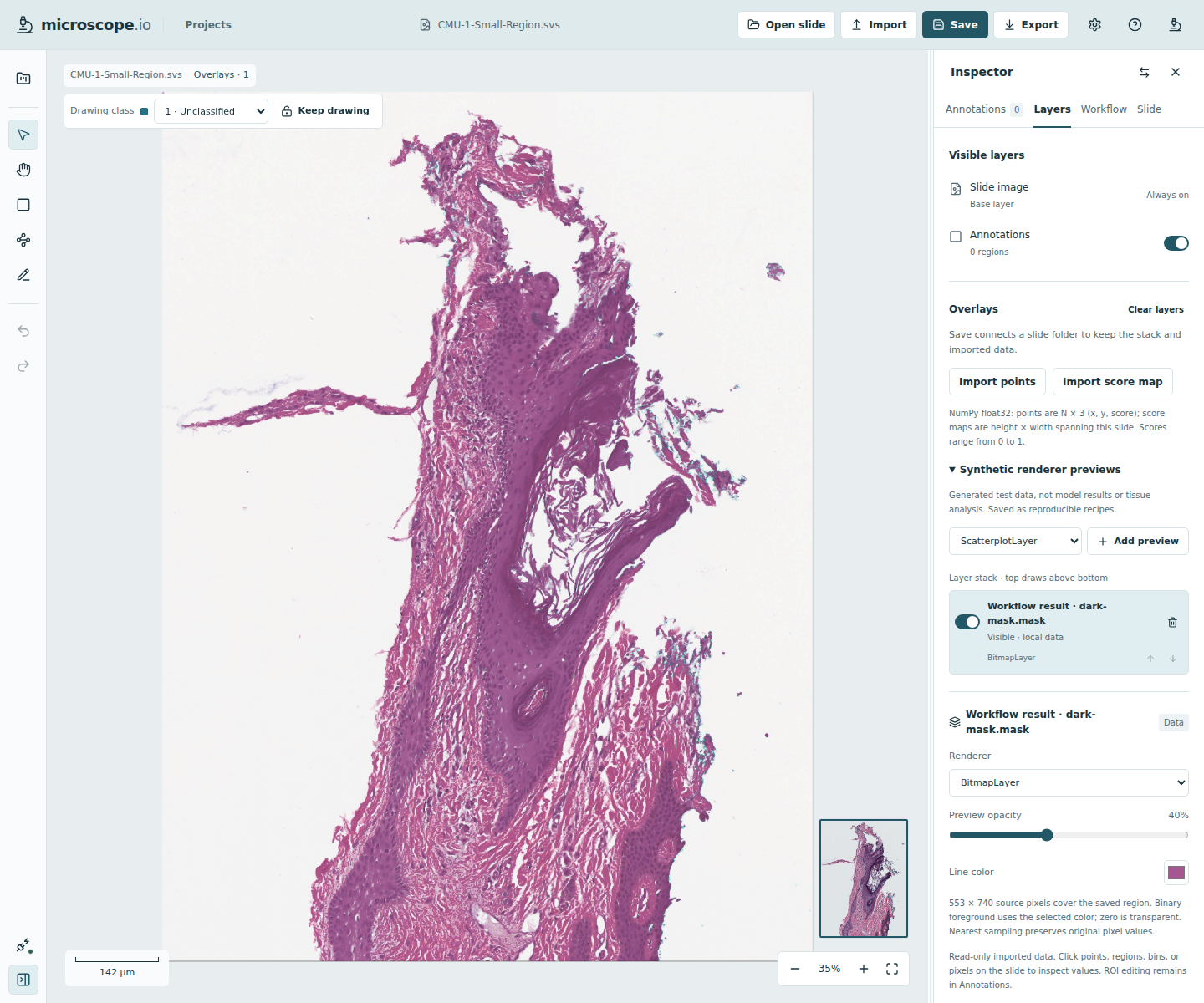
WSI Region (image) → Mean dark-pixel mask (image → mask)Select the source and choose a bounded scope such as viewport; set its working MPP to a measured, supported resolution. Select the custom node and edit Mean intensity cutoff in the parameter inspector. Choose Run, wait for the mask output, then choose Add to Layers. The result appears as a normal local raster layer. Save the slide workspace if you want to keep it.
The sample workflow is a graph template: the viewer supplies the currently opened slide region and transient input ID when you run it. The graph contains no WSI content or local path. The example node is region-scoped; it does not declare the tile-local contract needed for full-slide tile execution.
6. Package for another machine
When ready to share the pack, commit its manifest, Python package, and dependency metadata in a Git repository. In Workflow → Add Nodes from Git, paste a credential-free HTTPS URL, review the declared code, dependencies, commit and schemas, then explicitly trust and install that commit. To make future changes available, review/install a new exact revision; updates are not silently applied.
The local developer registration above is easier while editing. The Git installation flow can build a dedicated environment from the package manifest, but is not an OS-level sandbox: the pack is executable trusted code.
Troubleshooting
| Problem | Check |
|---|---|
No module named microscope during install | Install the Python SDK editable into the node environment, or use the companion's managed Git-install workflow. Pack processes receive the framework bootstrap, but developer imports and smoke tests need the SDK installed in that interpreter. |
| Package is installed, but its node is absent | Confirm microscope-node.toml is at the checkout root, the nodes binding names the correct module:Class, and the registration points to the same interpreter where NumPy and the pack are installed. Restart the companion and refresh the viewer catalogue. |
| Pairing fails | Confirm microscope serve is running and --origin exactly matches the page origin. Check the browser's local-network permission and workstation firewall. |
Expected an RGB image | Use the built-in WSI Region image source, not a grayscale or mask layer source. |
| A workflow parameter is rejected | Keep the JSON value within the Float bounds in the node class; do not rename the port or stable node ID after workflows depend on it. |
| A result fails spatial validation | Preserve input height/width. If an algorithm resamples or crops, implement and test an explicit geometry mapping before exposing it as a spatial output. |
More detail
- Python node-pack manifest and Git trust model
- Local workflow execution and spatial contracts
- MCP workflow authoring
- Generated official node schema reference